I have been drawing or attempted to draw Tony Chua who is a friend of mine ever since I got to know him in 2012 during an sketching trip organised by Urbansketchers Singapore. He has a very iconic uncle look, with huge framed glasses, straw hat and cute moustache. I could draw so many iterations of him in different media and in different stylization. There is more in him than meets the eye LOL! The ones posted here are my favourite but I am still trying to get one that best describe him and his personality.
Showing posts with label digital painting. Show all posts
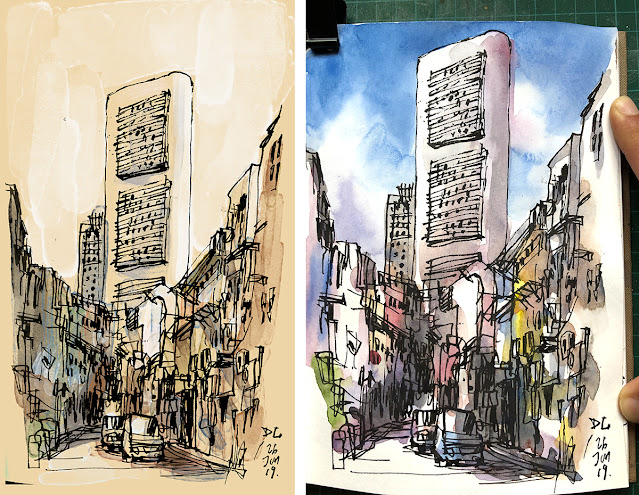
A friend was sketching on-location at a back lane in Boat Quay, Singapore. he posted a picture of the location and the angle he was sketching on FB. I was having some free time on hand, so I sketched it on my sketchbook the moment I saw the picture. For this drawing, I was using a 9018 Hero Fountain pen filled with Atramentis Archive black ink. The ink is waterproof and light fast as well.
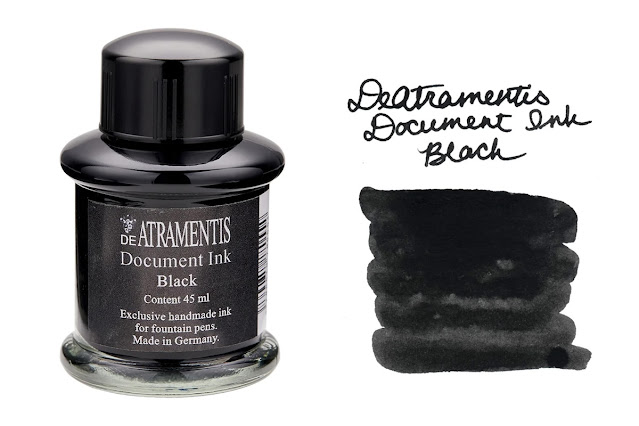
Image above is from gouletpens.com (https://www.gouletpens.com/products/de-atramentis-document-black-35ml-bottled-ink) Archive and Document Ink are similar.
I scanned the sketch and opened it in a drawing app on my desktop. Converted the drawing layer into "Multiply" colour mode and added colours on a second layer below. The background colour was also added digitally to emulate a toned paper. I won't pass any chance of adding colours to my sketch with watercolours too. I extended up the canvas to balance the composition when I was painting digitally. I have more colours when I was painting with watercolours. I quite like the results from both.
Sometimes finding brushes for your Digital Painting Apps is like finding gold. However, there is no need to dig deep because at this time and age, resources are everywhere on the Internet. One of them is "Daub Brushes" - a website resource created by Paolo Limoncelli who has made brushes for apps like Clip Studio Paint, Procreate, Photoshop and even Affinity Designer. You may follow his twitter account here. Most importantly his brushes are available here - https://www.daub-brushes.com/#home
A UX/UI designer by day, a brush technical experts by night. Daub brushes emulated natural look of how real brushes created strokes on paper or canvas with real paint and pigments. I am particularly interested in the brushes he created for Clip Studio Paint.
There is one set he is giving free - that is the Pencils brushes. I downloaded the free Pencils to give it a try. They responded very well to the app. No lag and they look pretty natural. There is info if you need to customise the tools - https://gumroad.com/read
The result of my test.
On the website, he features some artists who used his brushes to create art.
https://www.daub-brushes.com/#gallery
Brushes are just tools. Ultimately, the artists' creativity and innovation play is more important in creating and making art. You may have the best tools in the world, but you may not be able to wield them as you wish if you don't practice or see the real world with your eyes and observation.
I have been using Clip Studio Paint more so I could avoid using Photoshop. Kyle's brushes on Photoshop CC 2018 and 2019 are awesome. I am so tempted to use them but Photoshop can be quite expensive (Pricing). It is also getting heavy on the machine, running slower than ever. I need something fast and intuitive. Though Clip Studio requires somewhat a learning curve, it is still worthwhile to have another tool up your sleeve. In fact Clip has been winning more and more artists over to its side as it has more functions, runs lighter and faster, and doesn't require a yearly subscription fee. Upgrade is free too.
So far I have created a full comic book in Clip Studio totally, from scratch to print without Photoshop which proves that Clip is as robust as the more popular app in the market.
A UX/UI designer by day, a brush technical experts by night. Daub brushes emulated natural look of how real brushes created strokes on paper or canvas with real paint and pigments. I am particularly interested in the brushes he created for Clip Studio Paint.
There is one set he is giving free - that is the Pencils brushes. I downloaded the free Pencils to give it a try. They responded very well to the app. No lag and they look pretty natural. There is info if you need to customise the tools - https://gumroad.com/read
The result of my test.
6 tools suitable for drafting, shading or whatever...
Fast, texture free and snappy!
Greasil - Greasy pencil
Natural Pencil MkII HB and 2B - Based on my Natural Pencil preset
Fine Pencil Hard and Soft - No tilt here, fine and fast.
For Shading - Flat, realistic shading graphite
Plus New presets and a Quick&Dirty solution to tilt pencil for shading designed for non-wacom users
https://www.daub-brushes.com/#gallery
Brushes are just tools. Ultimately, the artists' creativity and innovation play is more important in creating and making art. You may have the best tools in the world, but you may not be able to wield them as you wish if you don't practice or see the real world with your eyes and observation.
I have been using Clip Studio Paint more so I could avoid using Photoshop. Kyle's brushes on Photoshop CC 2018 and 2019 are awesome. I am so tempted to use them but Photoshop can be quite expensive (Pricing). It is also getting heavy on the machine, running slower than ever. I need something fast and intuitive. Though Clip Studio requires somewhat a learning curve, it is still worthwhile to have another tool up your sleeve. In fact Clip has been winning more and more artists over to its side as it has more functions, runs lighter and faster, and doesn't require a yearly subscription fee. Upgrade is free too.
So far I have created a full comic book in Clip Studio totally, from scratch to print without Photoshop which proves that Clip is as robust as the more popular app in the market.
I have been using Procreate to paint more now. This time I am attempting to paint clouds in the Manga/ Anime style. Following some tuts found from the Internet, I tried painting some generic clouds and then duplicating some to create a variety. Here's the result:
The numbers indicate the sequence of attempts. The last and the most satisfactory attempt is placed on the top right hand corner, and duplicated on the left with some transformation. The gradient of the background is done with an airbrush tool modified to the largest size and taking advantage of the pressure sensitivity of the Apple pencil to create a smooth transition. I use the Smudge tool to blend the edges of the clouds to make them look natural. It would be wise to paint hard edges first and then blend in an outward motion after.
To make the clouds look natural, one tip is to design the shapes to be asymmetrical. Have different transparency on all the clouds and edge transitions too. Every cloud has to look different. That's the challenging part.
My next test would be to paint different types of cloud and then eventually create a cloud scene in different time of day.
#animeclouds #paintingclouds #procreate #applepencil #ipadpro #clouds #paintclouds #animeclouds
The numbers indicate the sequence of attempts. The last and the most satisfactory attempt is placed on the top right hand corner, and duplicated on the left with some transformation. The gradient of the background is done with an airbrush tool modified to the largest size and taking advantage of the pressure sensitivity of the Apple pencil to create a smooth transition. I use the Smudge tool to blend the edges of the clouds to make them look natural. It would be wise to paint hard edges first and then blend in an outward motion after.
To make the clouds look natural, one tip is to design the shapes to be asymmetrical. Have different transparency on all the clouds and edge transitions too. Every cloud has to look different. That's the challenging part.
My next test would be to paint different types of cloud and then eventually create a cloud scene in different time of day.
#animeclouds #paintingclouds #procreate #applepencil #ipadpro #clouds #paintclouds #animeclouds

When I received a mail from Wacom inviting me to test run and review the newly released Intuos 5 Touch, I was elated because I have already heard raving news about it. 2 days ago I got my set and eagerly "unbox" it. The package consists of a tablet (digitized pad) that can be plugged to the USB port of the computer and a Stylus (digital pen) that works with the tablet in tandem. It also comes with an optional RF add-on or the Wireless Accessory Kit that could make the tablet wireless, so you could work without the hassle of cluttering your working table top with too many wires, or glued to your work desk.
For anyone who is new to the product, the tablet is a pressure sensitive device that could detect how much pressure is translated to it via the pen as you draw or write with it. It works very well with applications like Photoshop and Painter. As you apply more or less pressure, the result is a variation of thickness of your pen or brush strokes, or more or less paint as you draw and paint in these application. Therefore you have more control over your work as compared to using a mouse. For any aspiring digital artist, a tablet is a must.
I have been using a tablet since the Intuos 2, so that was about 10 years ago. I bought for myself a 12" X 12" Blue then but found it too big later. Then I got a used Intuos 2 6X8 (Silver Grey) which was pretty nifty to use with my MacBook. When I upgraded to an 24" LCD screen, I bought a Intuos 3 to go with it just for the Screen-Tablet ratio. Through these, I see the change in the design of the tablet. The latest release, like the 4, has a sleek, black but matted surface, yet soft to the touch. It looks contemporary. When you plug it in, the work area lighted up on the tablet surface. Its show 4 small corner light indications, so if you are always working in the dark, these show you where your tablet working area is. In addition, the stylus now delivers 2048 levels of pressure. I was excited to test this out because I do draw and ink with the stylus pen a lot. The increase in the sensitivity would allow me to work more intuitively, at the same time delivering a more realistic stroke result with less effort.
I will be testing the tablet and showing the outcome here for the next few days while I still have it. So stay tune.
[caption id="attachment_1949" align="alignnone" width="865" caption="A Patient in Ward 63"]
[/caption]
I have been visiting my dad at the hospital everyday since last Sun when I came back from my holiday trip. Yesterday evening he looked much better, especially after we combed his hair and helped him shave. I believe he is getting better and I looked forward to the day he would be discharged. But that would mean another challenge of how to get him back to the regular life routine again. We are definitely getting an extra hand to help him around the house since my parents are staying on their own. And certainly to ease my mom from the house chores and taking care of my dad. There are many things to think about, but I am quite positive about things getting better in the days to come for the Lord is with us.
Anyway here's a sketch of a frail looking elderly man resting on his bed in the hospital ward. When he later called out to the nurse, I realized he is not that frail after all. Sketch done with Hero on brown paper, painted with Photoshop.
[/caption]I have been visiting my dad at the hospital everyday since last Sun when I came back from my holiday trip. Yesterday evening he looked much better, especially after we combed his hair and helped him shave. I believe he is getting better and I looked forward to the day he would be discharged. But that would mean another challenge of how to get him back to the regular life routine again. We are definitely getting an extra hand to help him around the house since my parents are staying on their own. And certainly to ease my mom from the house chores and taking care of my dad. There are many things to think about, but I am quite positive about things getting better in the days to come for the Lord is with us.
Anyway here's a sketch of a frail looking elderly man resting on his bed in the hospital ward. When he later called out to the nurse, I realized he is not that frail after all. Sketch done with Hero on brown paper, painted with Photoshop.
Not sure why but my blog has been hacked and tampered with several times in a row this week. When I accessed my blog this morning, I received a error message that said something like parse error on line 18 of my index.php. Downloading and opening up the file revealed a string of illegible gibberish. Without further delay I replaced it with my backup. It works. I followed up my changing my directory password for my hosting account and so forth. Since I am a very low-tech guy, that's about all I can do. If such thing occurs again, I will be darned.
Anyway here's a new self portrait drawn as Vincent van Gogh my fav artist after he cut off his ear.

Anyway here's a new self portrait drawn as Vincent van Gogh my fav artist after he cut off his ear.

Showing here 2 WIPs as part of the daily draw and sketch exercise. Both characters came to mind when I was minding my own business on the great white throne this morning so I couldn't wait. It's part of a painting and character design practice. You know, we artists have to sharpen our skills all the time, any spare time we can find in our hands.
[caption id="attachment_525" align="alignnone" width="500" caption="Close Up WIP"]
[/caption]
[caption id="attachment_520" align="alignnone" width="500" caption="Baboon human with a strange hair"]
[/caption]
[caption id="attachment_521" align="alignnone" width="500" caption="Old Red Riding Hood"]
[/caption]
[caption id="attachment_525" align="alignnone" width="500" caption="Close Up WIP"]
[/caption][caption id="attachment_520" align="alignnone" width="500" caption="Baboon human with a strange hair"]
[/caption][caption id="attachment_521" align="alignnone" width="500" caption="Old Red Riding Hood"]
[/caption]
ABOUT ME

Don Low is a freelance illustrator and a published comic artist based in Singapore. He sketches and paints in his free time, at the same time teaches drawing and art as an adjunct lecturer.
life is the art of drawing without an eraser.
POPULAR POSTS
Contact Form
Categories
Sketch Journal
154
Gallery
92
Urban Sketching
73
Illustration
49
Sketchwalks
35
Digital Art
31
#urbansketching
22
sketches
21
brush pen
16
urban sketchers
16
Watercolor painting
13
procreate
13
digital illustration
12
watercolor
12
Life Drawings
11
sketching
11
digital painting
10
sketching people
10
Pentel Brush Pen
9
hero fountain pen
9
urbansketchers
9
acrylics
8
urban sketches
8
usk
7
people sketching
6
plein air
6
#inktober
5
acrylic painting
5
digital sketch
5
Brush Pen
4
#oneweek100people
3
brushpen
3
digital comics
3
hero pen
3
illustrations
3
ink drawing
3
oil painting
3
portrait
3
sketch book
3
Hero pens
2
concept design
2
drawing from life
2
graphic novel
2
illustrated journal
2
inktober
2
life drawing
2
muralpainting
2
oil paints
2
onlinesketching
2
pens
2
sketch people
2
virtualsketch
2
virtualsketching
2
brushes
1
concept art
1
concept designs
1
concept drawing
1
drawingpeople
1
heropen
1
inkandwash
1
inkdrawing
1
inkdrawings
1
pen and ink
1
pencil drawings
1
pencil sketch
1
pentel pocket brushpen
1
peoplesketching
1
portrait drawings
1
singapore artist
1
storyboards
1
studio setup
1